
Overview
AzSDK MD5 ActiveX DLL allows you to calculate a "message digest" code on any file or string of text. This digest consists of a 128-bit code that can act as a digital signature for documents, files, and virtually any kind of digital data.
AzSDK MD5 ActiveX DLL is an ActiveX DLL for windows developers, Developer can call from Visual Basic, PHP, ASP, ASP.Net, C#, VB.Net, Delphi, Java, etc.
What is MD5 ActiveX DLL?
AzSDK MD5 ActiveX DLL is for ASP, Cold Fusion, VB, VC, .NET, PHP, and other languages.
The ActiveX DLL will quickly generate an MD5 string from a text string or file content.
AzSDK MD5 ActiveX DLL creates an RFC1321 compliant MD5 string from a string of text or file content, The MD5 algorithm takes as input a string of arbitrary length and produces as output a 128-bit "fingerprint" or " message digest" of the input string. It is conjectured that it is computationally infeasible to produce two messages having the same message digest or to produce any message having a given prespecified target message digest. The MD5 algorithm is intended for digital signature applications, where a large file must be " compressed" in a secure manner before being encrypted with a private (secret) key under a public-key cryptosystem such as RSA. In essence, MD5 is a way to verify data integrity and is much more reliable than checksum and many other commonly used methods.
Copyright of the MD5 Message-Digest Algorithm belongs to RSA Data Security, Inc.
Key Features
- Generates an MD5 string from a text string or file content.
- Supports .NET and Win32 applications.
- It can be used with many programming languages and popular server-side script languages like Visual Basic, PHP, ASP, ASP.NET, C#.NET, VB.NET, Delphi, Java, etc.
- Support Windows XP/VISTA/7/8/10/11 and Windows Server 2003/2008/2012/2016(Include R2).
- Support Windows 32-bit and Windows 64-bit.
- Full install/uninstall support.
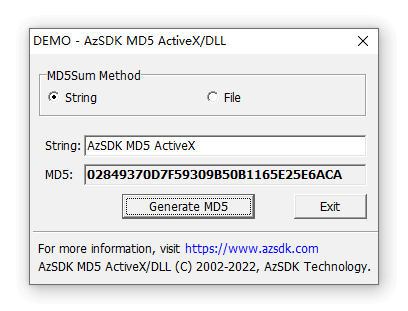
Screenshot
Sample Code
» Visual Basic
  Private Function GetMD5FromStringAndFile()
     Dim obj As AzMD5Sum.MD5
     Set obj = New AzMD5Sum.MD5
     obj.SetLicenseKey("License Code")
     Text1.Text = obj.GetMD5String("AzSDK MD5 ActiveX")
     Text2.Text = obj.GetMD5File("c:\windows\notepad.exe")
     Set obj = Nothing
  End Function
» Delphi
  procedure GetMD5FromStringAndFile;
  var
    obj: OleVariant;
  begin
    obj:= CreateOleObject('AzMD5Sum.MD5');
    obj.SetLicenseKey('License Code')
    Edit1.Text = obj.GetMD5String('AzSDK MD5 ActiveX')		//String MD5
    Edit2.Text = obj.GetMD5File('c:\windows\notepad.exe')	//File MD5
    Obj := Unassigned;
  end;
» ASP
<%
  Set obj = Server.CreateObject("AzMD5Sum.MD5")
  obj.SetLicenseKey ("License Code")
  dim md5
  md5 = obj.GetMD5File("C:\yourfile.dat")
  rem OR
  md5 = obj.GetMD5String("AzSDK MD5 ActiveX")
%>
» C#
  AzMD5Sum.MD5 md5 = new AzMD5Sum.MD5();
  string strFile = md5.GetMD5File("C:\yourfile.dat");
  string str = md5.GetMD5String("AzSDK MD5 ActiveX");
» ColdFusion
  Filename: #filename# : MD5 : #Obj.GetMD5File( filename )#
  MD5 by AzSDK Technology : #Obj.GetMD5String("AzSDK MD5 ActiveX")#
» PHP
  getMD5File( $filename );
    $md5 = $Obj->GetMD5String("AzSDK MD5 ActiveX");
  ?>