Overview
AzSDK HardwareID DLL is a standard Windows dynamic link library (32-Bit) and allows you to get unique machine fingerprints collected from CPU, HDD, BIOS, NIC components in your windows programs.
HardwareID DLL can work with Windows 9x to Vista and Win7, doesn't require to have administrator rights, and can work in restricted areas. The fingerprint ID is obtained directly from the hardware, not from the registry. Our solution allows you to select hardware to make ID as you wish.
AzSDK HardwareID is a reliable API to generate a unique simplified ID to identify each computer. You can use this ID to lock each license just by machine with your existing license copy protection. Now you can prevent unauthorized installation or cope and increase your sales.
 Tips:
HardwareID DLL is a Windows dynamic link library and allows you to get unique MachineID collected from CPU, HDD, BIOS, NIC components in your windows programs.
If you are looking for a solution to protect your windows application, please free trial License Shield SDK, with a few function calls, it helps you "add trial features" in your projects easily and quickly.
Tips:
HardwareID DLL is a Windows dynamic link library and allows you to get unique MachineID collected from CPU, HDD, BIOS, NIC components in your windows programs.
If you are looking for a solution to protect your windows application, please free trial License Shield SDK, with a few function calls, it helps you "add trial features" in your projects easily and quickly.
Key Features
- Support generate unique simplified ID to identify each computer and your programs.
- Support detect whether running in a virtual machine environment.
- Support many development languages, such as Delphi, C++Builder, VC, VB, C#, VB.NET, PowerBuilder, PowerBasic, Visual Foxpro, Clarion, etc.
- Support calling DLL from Microsoft VBA, such as Word, Excel, Access, PowerPoint.
- Support rename HardwareID.DLL to other file names or place to other folders.
- 100% Safe DLL file, can not be Some firewalls (like Zone alarm) block.
- The Hardware ID is an affordable and reliable API than dongle price and easy to use.
- The Hardware ID is a simplified ID so that anyone can communicate by phone, fax, or email.
- No delay time to delivery your software, no need to send anything by post.
- Support Windows XP/VISTA/7/8/10/11 and Windows Server 2003/2008/2012/2016(Include R2).
- Support Windows 32-bit and Windows 64-bit.
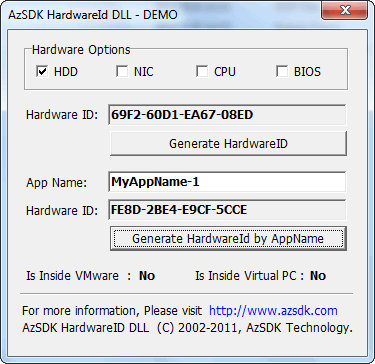
Screenshot
Sample code
Reviews